Why your analytics data may not match reality
If your page views, events, or navigation tracking seem off, scan your site to identify duplicate, missing, or mistimed tracking.
Currently validates GA4, Google Tag Manager, and Google Ads only.
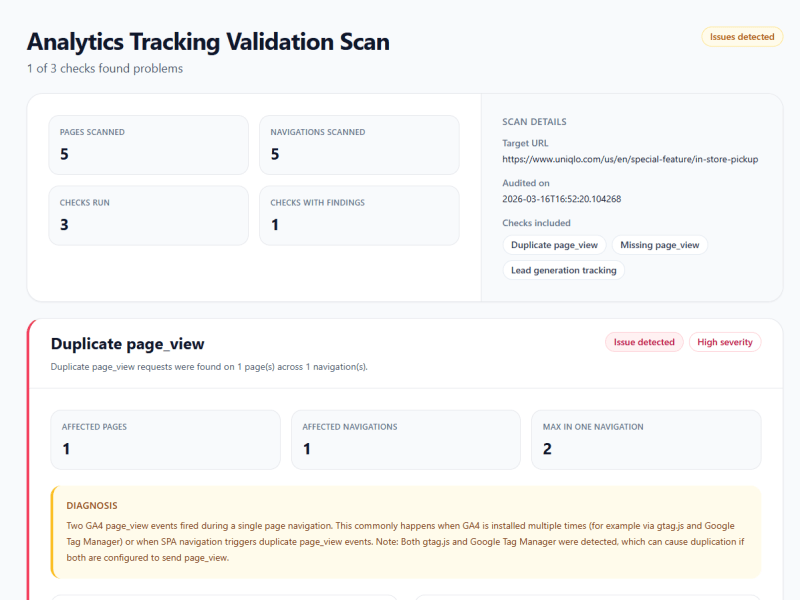

Sample Scans
See public reports showing what was captured and what issues were found.
Missing GA4 page_view Events
This scan detects pages where the GA4 page_view event does not fire, a common cause of missing traffic data and incomplete analytics.
GA4 IDs Differ Across Pages
This sample scan shows inconsistent GA4 measurement IDs across pages, which can split analytics data and make reporting less reliable.
What the scan checks
The scanner loads multiple pages on your site, captures analytics requests, and identifies issues that affect tracking accuracy, including duplicate events, missing sends, and other tracking anomalies that lead to incorrect metrics.
Signs your analytics data might be inaccurate
Traffic spikes without growth
Page views or sessions jump suddenly without corresponding marketing or traffic changes
Inflated page view counts
Page views appear higher than actual user sessions or visits
Repetitive user journeys
Same page or event appearing multiple times in user path reports
Inconsistent metrics
Same metric shows different values in different reports or tools
Data not matching reality
Analytics numbers differ from your backend, CRM, or other systems
Technical causes of tracking accuracy issues
Multiple GA4 installations
GA4 installed via both gtag.js and GTM container simultaneously
Broken event triggers
JavaScript errors or wrong selectors preventing event capture
SPA navigation errors
History API listeners fire duplicate events or miss route changes entirely
Conflicting tag implementations
GTM, gtag.js, and CMS plugins sending duplicate or conflicting events
Race conditions
Events fire before dataLayer is ready or during async loading
Related articles
Learn how to diagnose and fix specific causes of inaccurate analytics data.